Free to start · on-device · no card
Free text to speech that keeps you on the page.
Any web page, article, PDF or EPUB, read aloud in the voices your browser already has. Each sentence and word lights up as it is spoken, so you follow instead of drift.
No account needed to start. Create a free one to sync your library across devices.
- Web app
-
 Chrome extension
-
 iPhone & iPad Soon
See it in action
A voice you can follow with your eyes.
Reading aloud is easy. Keeping you on the line while it happens is the part that took the work.
In the page you are on
No copying. No second tab.
The extension puts a small player on the article you already opened, and reads it in place, marking the paragraph, the sentence and the word as the voice moves through them.
How the extension works
Documents
A PDF that still looks like the PDF.
Most readers flatten a document into a wall of text before they will speak it. Lumotext renders the real pages and draws the highlight on top, so the figure, the table and the page number are all still where the author put them.
Reading PDFs aloud
Immersive mode
Everything but the article, gone.
One key strips the navigation, the sidebar, the cookie banner and the related-stories rail, and leaves the piece you came for in a clean column, at the text size you actually want.
More on reading aloud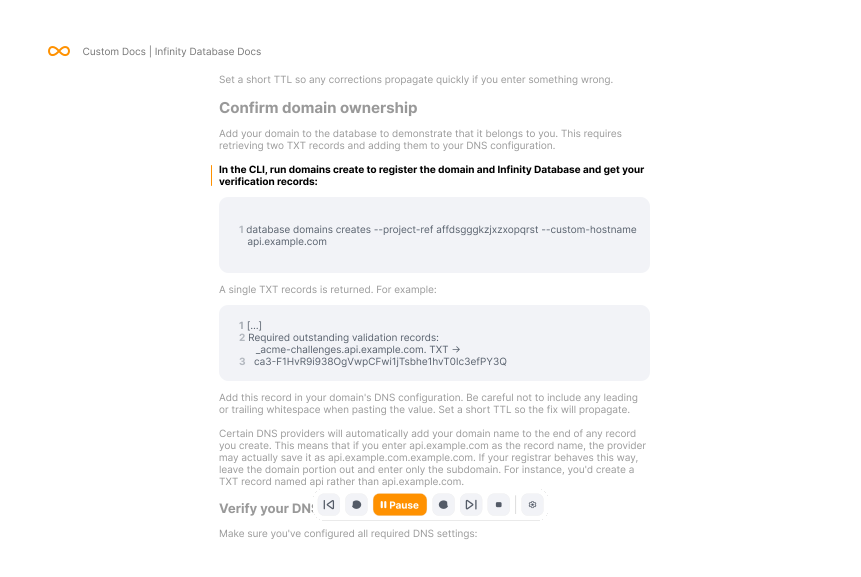
How it works
Text to speech built for staying with the text, not just hearing it.
Most text-to-speech is built for listening while you do something else. Lumotext is built for reading, with a voice as the thing that keeps you on the page.
Follow-along highlighting
Three levels at once: the paragraph you're in, the sentence being spoken, and the word on the voice's lips. Click any sentence to start reading from there.
Immersive mode
Strips a page down to the article itself and reads it in a clean view, one column or two.
Read PDF, EPUB, text & markdown aloud
Import a document and read it with the same controls. PDFs keep their real pages, with the highlight drawn over them, and EPUBs open chapter by chapter.
Every voice your browser has
System voices on macOS, Windows and Linux, including the premium ones you have already downloaded. Online voices are labelled, not buried.
Picks up where you stopped
Your place is remembered per page and per document, and follows your account between the extension and the web app.
Accessible reading, not an afterthought
A dyslexia-friendly typeface, speed from a crawl to a sprint, and code blocks that stay on screen but are never read aloud. The controls are keyboard-reachable and the highlight respects reduced-motion settings.
Two ways to use it
Read aloud in the page you're on, or in a place of its own.
In your browser
The browser extension adds a small player to any page. Hover a paragraph to read from there, or open immersive mode for the whole article. No account needed for any of it.
On the web
Paste text or import a document and listen right here. A free account means the pages you save from the extension are waiting in your library, with your place in each one kept.





Where to get it
Start in the browser you already have.
The iPhone and iPad app is next. It is the only way to keep reading with the screen off.
Chrome extension
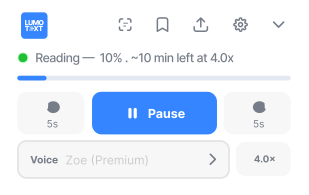
Reads the page you are already on. Hover a paragraph to start from there, or open immersive mode for the whole article.
No account needed Reads on any page Nothing leaves your device

iPhone & iPad
Reading in the background and with the screen locked: the two things a mobile browser cannot do. Join the waitlist and we'll email you the day it lands.
Privacy
What you read is nobody's business.
Reading happens on your device. No upload, no servers of ours in the loop, nothing about the text leaving the browser.
The web app works with no account at all. A free one adds a synced library, a saved place in every document, and settings that follow you. Never what you read, or where you read it.
Some browser voices are synthesised online by the browser vendor rather than on your machine. Those are labelled in the voice picker, so the choice is visible instead of buried.
Read the privacy policyFAQ
Text to speech questions, answered.
Is Lumotext free?
Yes. Reading text aloud in the web app is free, with no character limit and no card. An optional free account adds a synced library and keeps your place in each document across devices.
Does my text get uploaded anywhere?
No. Speech is synthesised on your device by your browser's own speech engine, so the text you are reading never reaches our servers. Some browser voices are synthesised online by the browser vendor rather than on your machine. Those are labelled in the voice picker. The privacy policy lists every network request the product makes.
What can Lumotext read aloud?
Web pages, PDFs, EPUBs, markdown, plain text and anything you paste in. PDFs keep their real page layout with the highlight drawn on top, and EPUBs open chapter by chapter with no conversion step.
Which voices does it use?
Whichever voices your operating system and browser provide, including Apple's enhanced and premium voices on macOS and the natural voices on Windows once you download them in system settings. We're also working on premium, more lifelike voices as an optional paid upgrade down the line.
Does it work on iPhone or iPad?
Not properly yet. Mobile Safari cannot keep speech going in the background or with the screen locked, and its voice list is unreliable. A native iOS app is being built for exactly that; until then, use a laptop or desktop browser.
Do I need an account?
No. The web app and the browser extension both work signed out. An account is only needed to sync a library and your reading position between devices.

Start reading in the next minute.
Paste something in and press play. No email, no account. Sign in later if you want it saved.
No account needed. Free to start if you make one.