No character quota
Nothing is metered on a server, so there is no monthly cap to run out of and no cost per thousand characters. A whole book costs nothing to read.
How it works · free · nothing uploaded
Most readers send your text to a server, render it into audio there, and stream it back, which is where character quotas, subscriptions and privacy questions all come from. Lumotext uses the speech voices already installed on your computer instead.
No account needed to start. Reading happens on your device.
The difference
Every text-to-speech product makes one architectural choice early on: synthesise the audio in the cloud, or synthesise it on the reader’s own device. Almost everything people compare between readers, price, limits, privacy, how fast playback starts, whether it works on a plane, falls out of that single decision rather than from any feature list.
Cloud synthesis costs the provider real money per minute of audio, so it has to be paid for: hence free tiers with character caps, monthly quotas, and the better voices sitting behind a subscription. It also means the text has to be uploaded before it can be spoken, which is the part worth thinking about before a contract, a medical letter or an unpublished draft goes into one.
Lumotext takes the other path. Your operating system already ships good speech voices, Apple’s enhanced and premium voices on macOS, the natural voices on Windows, and a browser can drive them directly. Nothing is rendered on our servers, so nothing has to be uploaded before you can listen. Reading with your system’s voices stays free; premium, studio-quality voices are on the roadmap as a paid option for anyone who wants that extra layer of realism.
The honest trade-off: the very largest neural voices only exist in the cloud, because no laptop renders them in real time. If one specific cloud voice is the reason you would pay for a reader, a hosted product still wins on that, and we would rather say so than pretend otherwise. What we compete on is the reading experience, see the reader or how it handles PDFs.
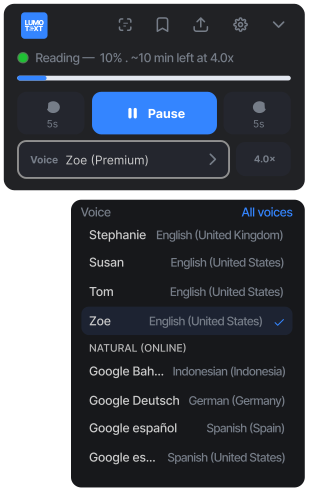
The voices are the ones your operating system already ships. Nothing is rented, nothing is metered.
What local synthesis buys you
Nothing is metered on a server, so there is no monthly cap to run out of and no cost per thousand characters. A whole book costs nothing to read.
The document is opened, extracted and spoken inside your browser. Work documents and unpublished drafts never reach a third party.
There is no render step and no buffering. The voice is already on your machine, so pressing play is immediate.
Voices your system stores locally keep reading offline. Voices your browser synthesises online are labelled in the picker so the difference is visible.
Download the enhanced voices in macOS System Settings or the natural voices in Windows Settings and they appear in the picker immediately, the same voices the system uses everywhere else.
Paragraph, sentence and word highlighted together, click a sentence to start there, PDFs keeping their real page layout, and your place kept per document.
FAQ
Yes, reading with your system’s voices has no trial period, no character quota and no card required. An optional free account adds a synced library and keeps your place in each document. We do plan to introduce a paid tier down the line for premium, studio-quality voices beyond what your system provides.
Better than most people expect, and they have improved a lot. Apple’s enhanced and premium voices on macOS and the natural voices on Windows are genuinely pleasant to listen to. The largest cloud neural voices are still ahead of them for realism, which is part of why a paid tier for premium, studio-quality voices is on the roadmap.
Correct, with one caveat worth stating plainly: a few browser voices are synthesised online by the browser vendor rather than on your machine. Those are labelled in the voice picker so you can avoid them. Everything else is local, and the privacy policy lists every network request the product makes.
PDF, EPUB, markdown and plain text, plus anything you paste in. PDFs keep their real page layout with the highlight drawn on top, and EPUBs open chapter by chapter with no conversion step.
Not properly yet. Mobile Safari cannot keep speech running in the background or with the screen locked. A native iOS app is being built for exactly that; for now, use a desktop browser.

Paste something in and press play. No email, no account. Sign in later if you want it saved.
Free to use. An optional free account syncs your library across devices.